September 2026 Release Notes
Q3 2026 / Arthur Terechtchouk
The September 2026 Risk Management Release 3 introduces a more complete, configurable, and traceable experience for identifying, reviewing, updating, and analyzing risks across the project lifecycle. New intake workflows, automated update processes, configurable scoring and notifications, dashboard analytics, and Monte Carlo simulation capabilities help teams maintain a current risk register, strengthen accountability, and make better-informed decisions using quantified cost and schedule exposure.
With this release we aimed to address the following key business requirements:
Inconsistent and delayed risk identification. Risks and opportunities often surface late or remain trapped in operational silos (field vs. office, internal vs. external). The Risk Identification app provides a controlled, shareable intake channel with manager review and approval before items enter the Risk Register, improving completeness and shortening the path from identification to registration.
Stale risk registers due to manual, ad-hoc updates. Without a structured cadence, Risk Owners rarely update records, so exposure data quickly becomes outdated. The configurable Risk Update engine automatically issues update tasks on a defined schedule, applies submitted updates to the live record, and retains a historical update log.
Weak accountability and missed follow-up. Ownership changes, pending updates, and overdue actions are easy to lose track of. Configurable notifications (owner assignment, update pending/due/overdue, update submitted, risk closed/reopened) plus the ability for Risk Managers to request or recall updates create clearer responsibility and timely visibility.
Inability to quantify cost and schedule exposure. Traditional likelihood/severity scales are often qualitative only, making it hard to understand real project impact. Configurable likelihood ranges (with explicit probability bands) and severity impact bands (project-specific cost and schedule ranges) allow risks to be quantified and used consistently for analysis.
Difficulty prioritizing risks and understanding overall exposure. Teams struggle to see which risks drive the majority of cost or schedule risk and lack a probabilistic view of total exposure. Monte Carlo simulation combined with dashboards (heat maps, risk drivers, cost/schedule exposure curves, and opportunity views) surfaces top contributors and confidence levels for better-informed decisions.
Limited traceability and response tracking across the risk lifecycle. Once a risk is logged, mitigation actions, strategy changes, and the evolution of the risk itself are often poorly documented. The combination of preserved intake-to-register traceability, response strategy selection (Avoid, Mitigate, Transfer, Accept, Exploit), mitigation date tracking within update tasks, and the historical Updates log maintains a complete, auditable record from identification through closure.
Risk Identification
The Risk Identification app is a new optional application that allows risks and opportunities to be collected from across the organization, bridging operational silos between office and field. It can be shared with internal and approved external users and supports capture of potential risks, manager review and validation, and controlled approval before an item is added to the Risk Register. This process helps validate intake, shorten the time from identification to registration, maintain full traceability, and reduce the administrative effort required to verify and document new risks.
Collects risk and opportunity submissions from users across the organization, including approved external participants.
Captures each identified item in a consistent form for review.
Routes the submission to a manager for review and approval.
Adds approved submissions to the Risk Register while preserving traceability from intake through approval.
Supports attachments and a portable risk/opportunity form for sharing outside the application.
Notifies the assigned Risk Owner when ownership is set, and notifies the new owner if ownership later changes.
The app is integrated with the Risk Register so that, once identified risks are screened and verified, all submitted data is carried over to the Risk Register automatically. This preserves completeness, reduces re-entry, and maintains full traceability from risk / opportunity identification.
Risk Register
The Risk Register app provides a centralized workspace for managing project risks and opportunities from identification through closure. It supports configurable scoring, ownership, update workflows, response strategies, notifications, dashboards, and Monte Carlo analysis so teams can maintain a current and actionable view of project exposure.
Automated Risk Update Function: A new configurable Risk Update engine allows users to define the project risk update period (Risk Owner Update Schedule) and automatically issue Update tasks to open Risk Owners. Submitted updates are applied to the risk record and stored for historical reference.
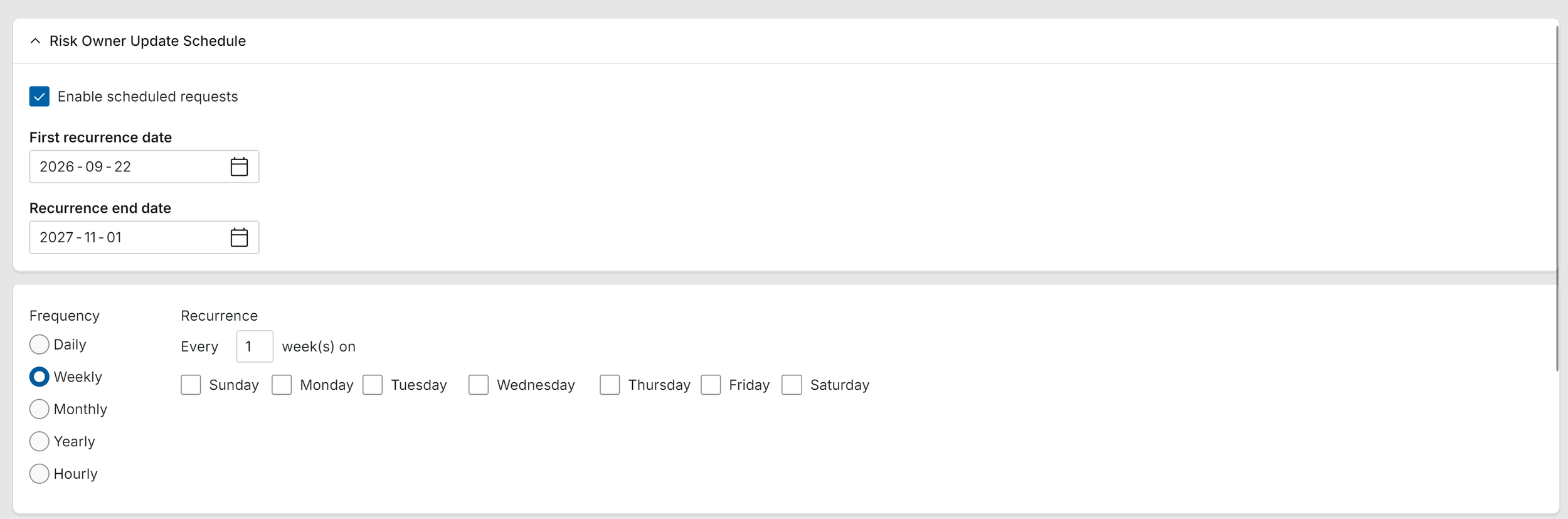
Administrators can customize the frequency at which Risk Owners receive update tasks under Configuration > Risk Register > Risk Update Schedule.
The Updates section of the Risk Register displays a table of historical updates, allowing users to review how each risk has evolved over its lifecycle.
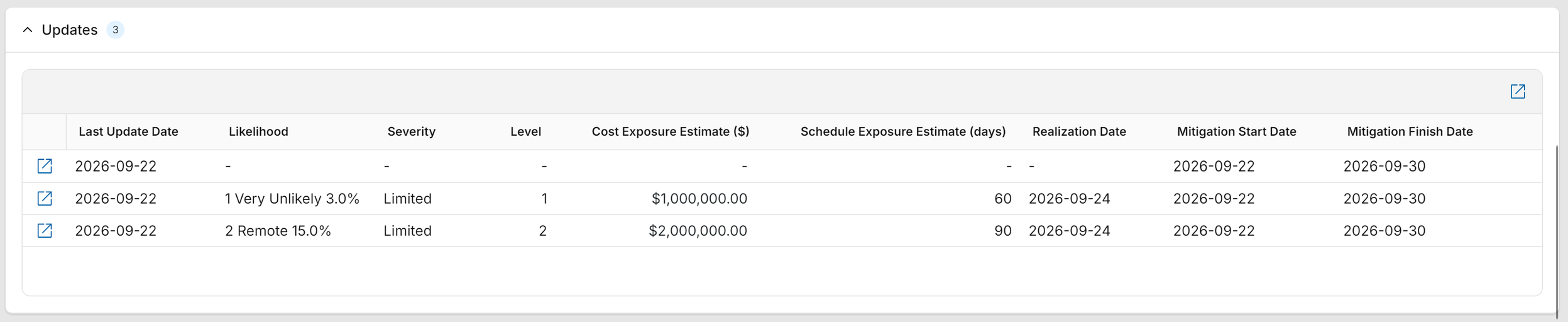
Each subsequent update of the risk will automatically populate the table and allow users to drill into the details of the update task.
Risk Managers can manually request a risk update or recall a pending update.
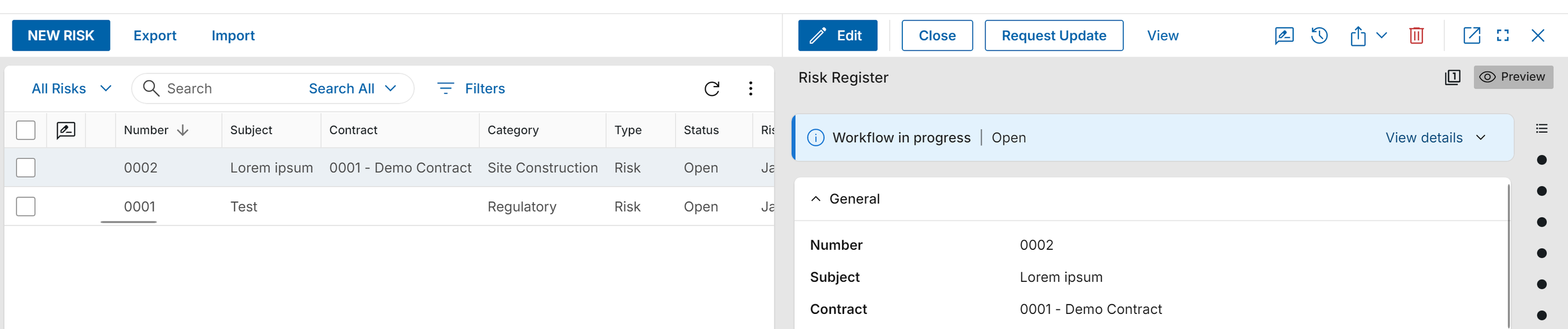
Risk Managers can view a list of risks with pending updates, along with the last update date and the user who submitted the most recent update.
Configurable Notifications
The risk process includes seven preconfigured notifications that support the workflow. Users can enable or disable notifications and set a Days Offset value to control how many days before the due date a reminder is sent. Additonal notificaions can be added with minimum effort.
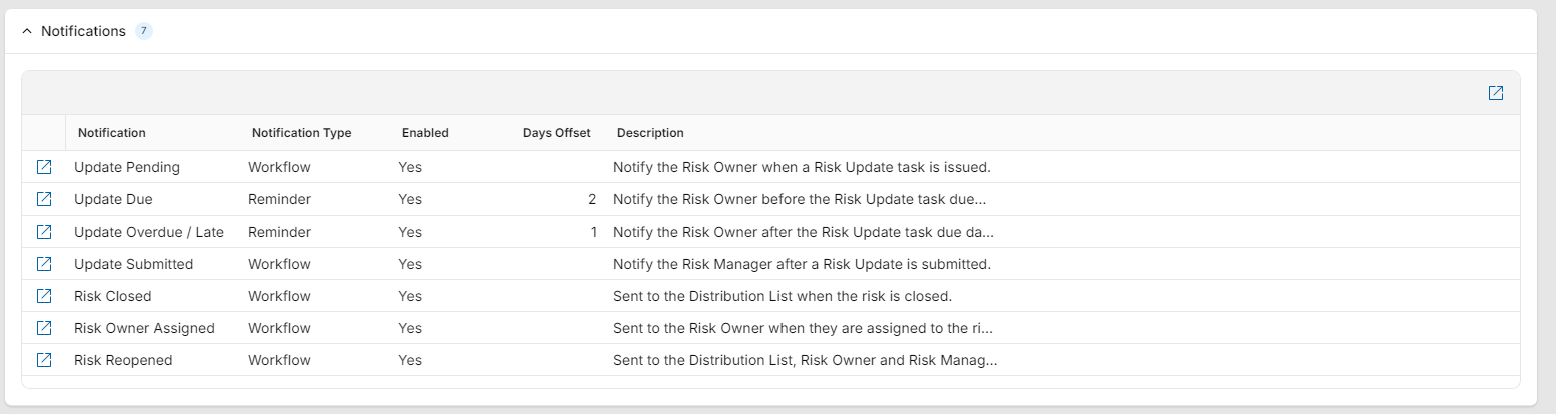
Update Pending: Notifies the Risk Owner when a Risk Update task is issued.
Update Due: Notifies the Risk Owner before the Risk Update task is due.
Update Overdue / Late: Notifies the Risk Owner after the Risk Update task is due.
Update Submitted: Notifies the Risk Manager after a Risk Update is submitted.
Risk Closed: Sends a notification to the Distribution List when the risk is closed.
Risk Owner Assigned: Notifies the Risk Owner when they are assigned to the risk.
Risk Reopened: Sends a notification to the Distribution List, Risk Owner, and Risk Manager when the risk is reopened.
Likelihood Scale
Administrators can configure likelihood ranges that map plain-language labels to probability percentage ranges under Configuration > Risk Register > Likelihood Scale.
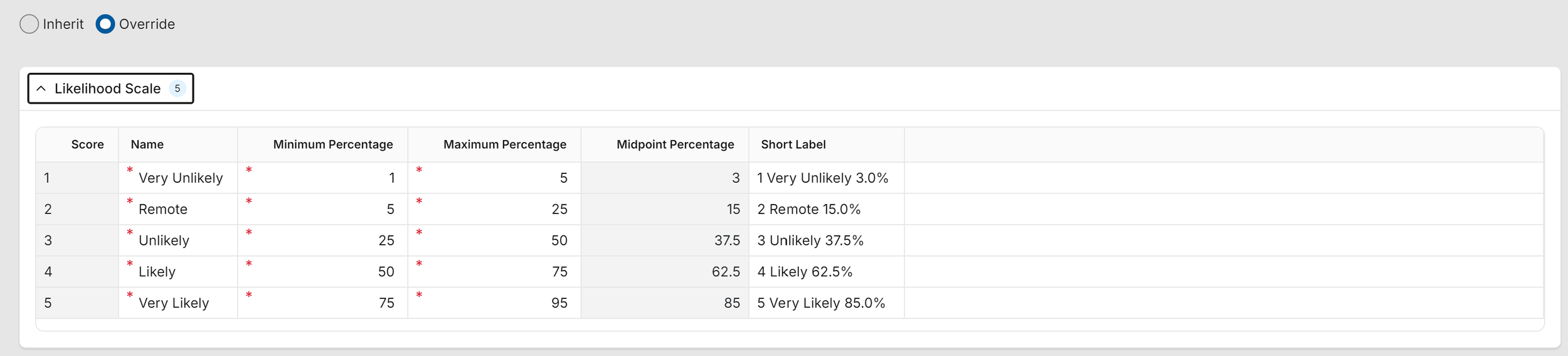
Minimum and maximum percentage values are entered for each likelihood range; the midpoint percentage is calculated automatically.
Supports explicit minimum and maximum probability percentages (rather than a single value), configurable terminology aligned with business language, and Monte Carlo analysis (using the calculated midpoint or random sampling within each probability band).
Severity Impact Bands
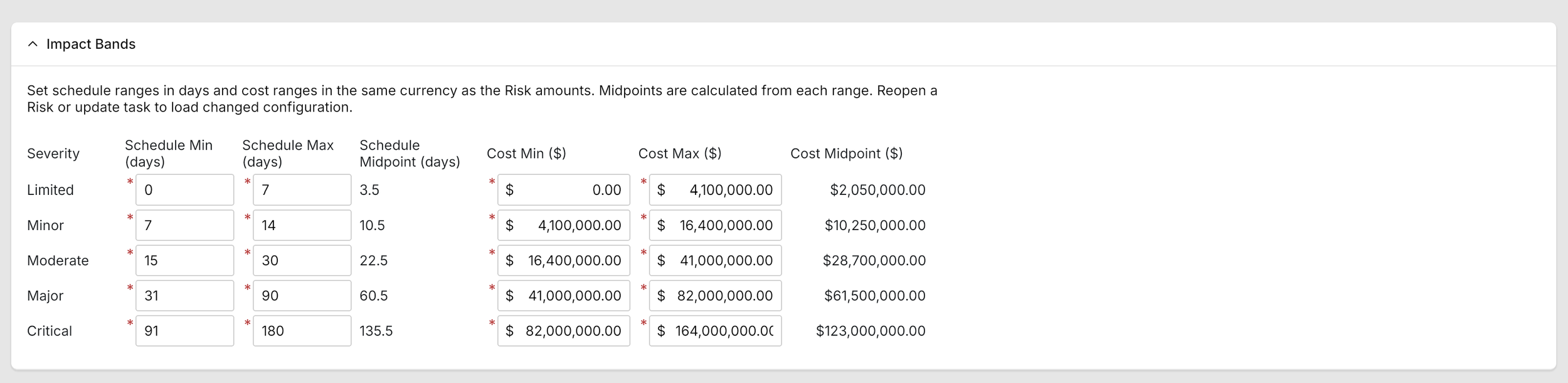
Severity impact bands allow administrators to set estimated schedule and cost impacts for each severity level under Configuration > Risk Register > Impact Bands. This enables risk levels to be quantified on a project-by-project basis. The configured cost and schedule impact values are displayed when a Severity value is selected on a risk record.
Response Strategy and Mitigation Plan
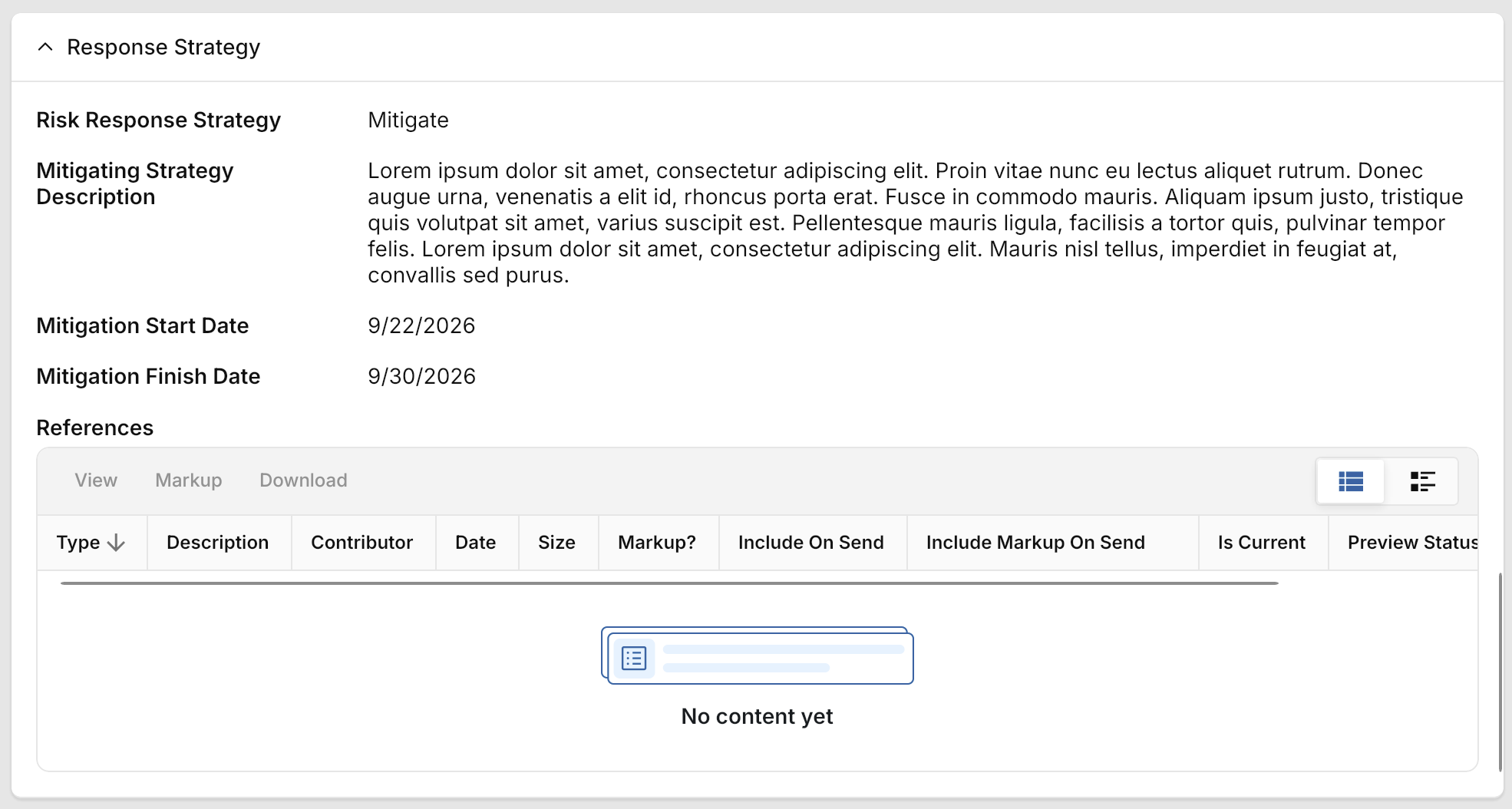
Risk Owners can select from response strategies such as Avoid, Mitigate, Transfer, Accept, or Exploit. Within the update task, they can provide mitigation updates and enter the mitigation start and finish dates.
Monte Carlo Simulation and Dashboards
Users can run Monte Carlo simulations using risk data and view dashboards and analytics to understand cost exposure, schedule exposure, key risk drivers, and opportunity performance.
Risk Management Dashboard: Shows percentage of risks versus opportunities, total number of risk records, average score (Likelihood Score × Severity Score), a heat map of risks by likelihood and severity, and an overview of action item statuses.
Risk Monte Carlo Overview: Provides metrics for cost and schedule results, along with percentile curves and distribution graphs.
Risk Drivers view: Displays the top risks by expected cost and schedule exposure and allows users to view details of all risks included in the report.
Opportunities dashboard: Mirrors the risk dashboard for opportunities, including percentage of opportunities versus risks, total number of opportunity records, a heat map by likelihood and severity, and action item status.
Monte Carlo | Cost Exposure: Displays exposure and confidence graphs from the Monte Carlo simulation and lists top cost exposure contributors.
Monte Carlo | Aggregate Schedule Impact: Displays schedule exposure and confidence results and lists the top schedule exposure contributors.